
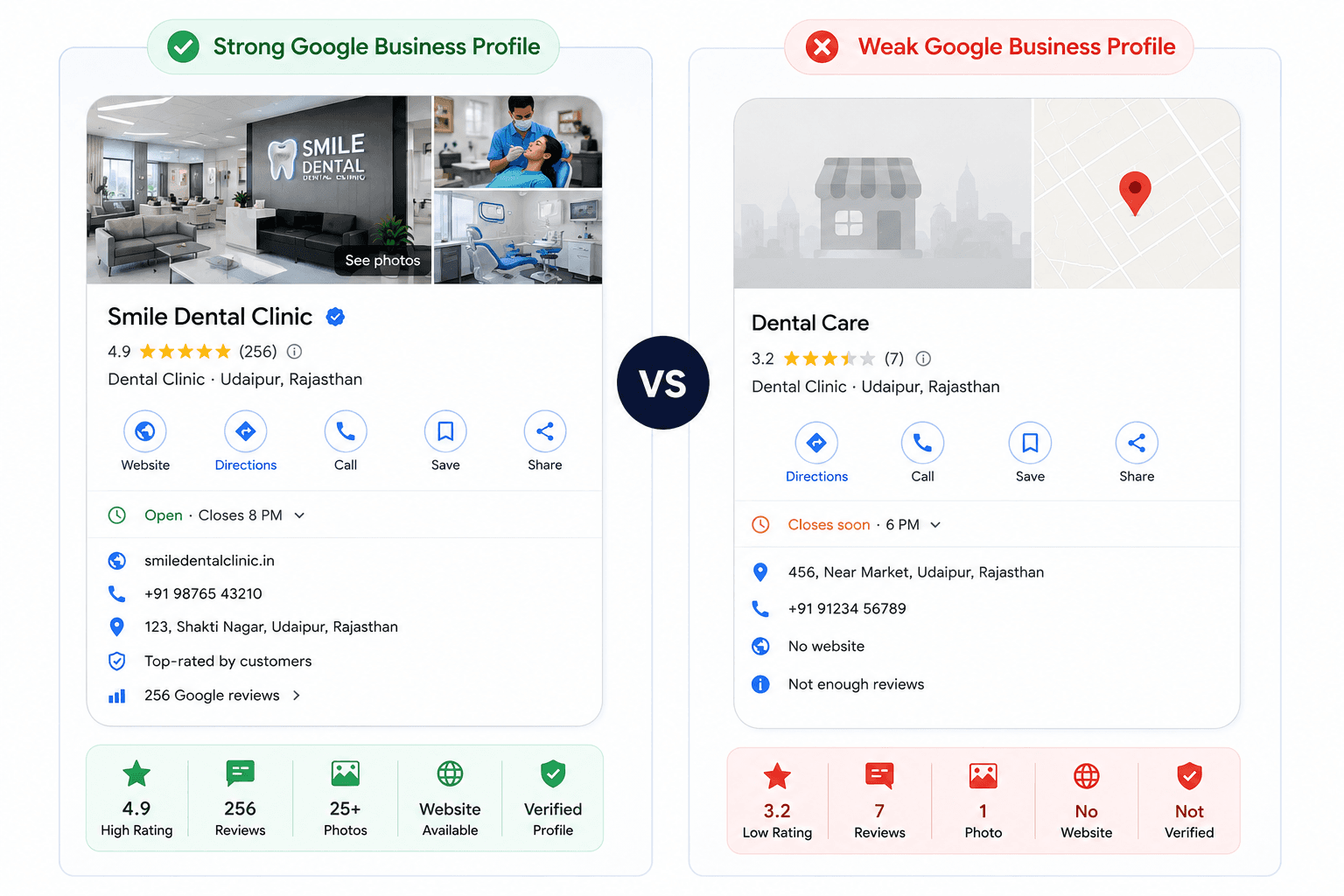
If you run a business in Udaipur, your Google Business Profile (GBP) is often the first impression a customer forms of you. Before they call, visit, or book, most people search on Google or Google Maps and judge your business by what shows up.
This guide covers every part of Google Business Profile optimization in one place: setup fundamentals, categories, business information, photos, reviews, posts, and the advanced issues (like suspensions and duplicate listings) that trip up even experienced owners.
Whether you’re just claiming your first listing or fixing a profile that’s underperforming, you won’t need a second article, this is the one guide to bookmark and return to.
What Is a Google Business Profile (And Why Businesses Can’t Ignore It)
A Google Business Profile is the free listing that appears on Google Search and Google Maps when someone looks for your business or for businesses like yours nearby. It shows your name, address, hours, reviews, photos, and more directly on the search results page, without the user even clicking through to your website.
For Udaipur businesses specifically, GBP matters because:
- Most “near me” searches (restaurants near me, dentist near me, gym near me) pull results primarily from Google Maps and the Local Pack, not organic web listings.
- Tourists and new residents rely heavily on Google Maps to discover businesses in a city they don’t know well.
- A well-optimized profile can outperform a poorly optimized website for local visibility.
Google Business Profile optimization isn’t a one-time setup task, it’s an ongoing process of keeping information accurate, adding content, and responding to customers.
Profile Fundamentals: Get the Basics Right First
Before working on anything advanced, make sure the foundational fields on your profile are accurate and complete. Google and your customers trust businesses that get the basics right.
Business Name
Use your real, legally registered business name exactly as it appears on your signage and website. Do not stuff keywords into the name field (e.g., “Sharma Dental Clinic Best Dentist Udaipur”) this violates Google’s guidelines and can lead to suspension.
Address (NAP Consistency)
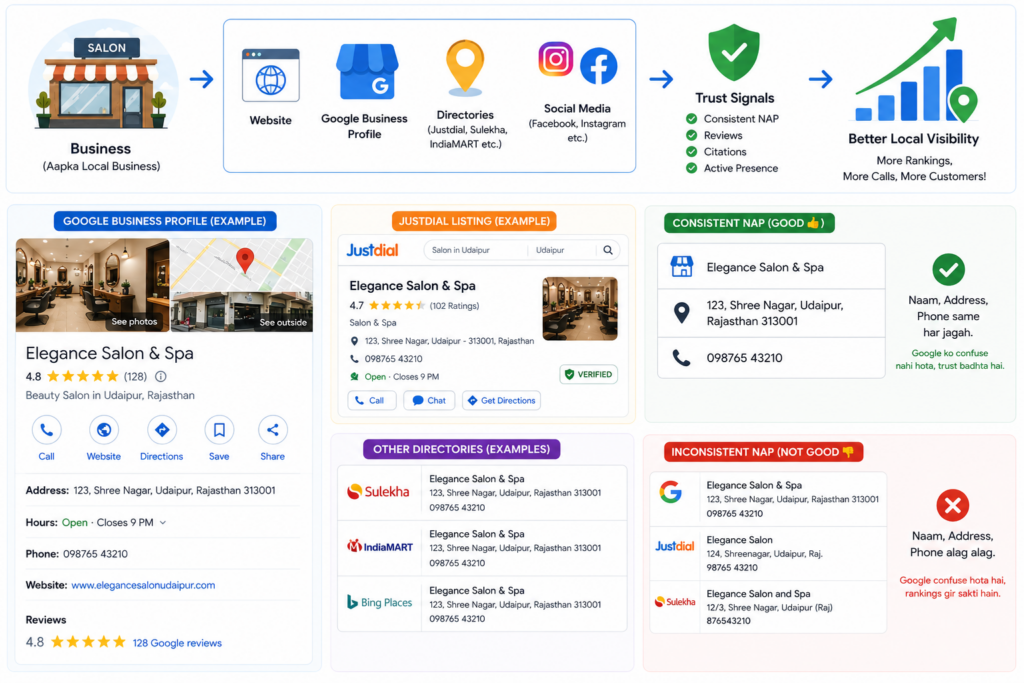
Your Name, Address, and Phone number (NAP) should match exactly across your GBP, website, and any other directories (JustDial, Sulekha, IndiaMART). Inconsistent addresses confuse Google’s algorithm and can weaken your local rankings.
For businesses without a physical storefront customer’s visit, address details can be hidden from public view while still verifying location internally (see Service-Area Businesses below).
Phone Number
Use a local Udaipur number where possible, and make sure it’s a number your staff actually answers. Missed calls from GBP are a common and easily fixable reason businesses lose customers.
Website
Link to your actual business website, not a generic homepage. If you don’t have a website, GBP allows you to generate a free basic one from your profile information, a reasonable stopgap while you invest in a proper site.
Opening Hours
Keep hours accurate and updated. Nothing frustrates a customer more than driving to a shop marked “Open” on Google, only to find it closed.
Special Hours
Update special hours for festivals, Diwali, Holi, monsoon closures, or local Udaipur events like the Mewar Festival. Google explicitly surfaces holiday hours to searchers, so this is a small task with outsized impact.
Service Areas
If you deliver services to customers (electricians, event planners, home tutors, cleaning services) rather than having customers visit you, define your service areas by city, locality, or postal code for example, Udaipur city plus nearby areas like Bhuwana and Debari.
Choosing the Right Categories
Category selection is one of the highest-impact and most overlooked parts of Google Business Profile optimization.
Primary Category
Your primary category should describe your core business as specifically as possible. “Dentist” is better than “Doctor.” “North Indian Restaurant” is better than “Restaurant.” Google weighs the primary category heavily when deciding which searches your profile appears for.
Secondary Categories
Add secondary categories to capture related services. A hotel might add “Wedding Venue” or “Banquet Hall” alongside “Hotel.” Only add categories that genuinely apply; irrelevant categories dilute relevance rather than expanding reach.
Category Selection
A simple framework for choosing categories:
| Step | Action |
| 1 | List every service you offer |
| 2 | Search each service on Google to see which category competitors use |
| 3 | Choose the most specific primary category available |
| 4 | Add 3–5 relevant secondary categories, no more |
Category Research
Use Google’s own autocomplete in the category field; it only shows categories that actually exist. You can also check competitor profiles (visible under their business name on the Maps listing) to see which categories are working well for similar Udaipur businesses.
Business Information That Builds Trust
Business Description
Write a clear, honest 750-character description covering what you do, who you serve, and what makes you different. Avoid keyword stuffing; write for a human reader first. Mention Udaipur naturally if it’s genuinely relevant to your service area.
Services
List individual services with short descriptions and, where appropriate, pricing. This section directly affects which searches trigger your listing.
A salon that lists “Bridal Makeup,” “Hair Spa,” and “Keratin Treatment” separately will surface for each of those searches specifically.
Products
Retailers, boutiques, and showrooms can add individual products with photos and prices. This turns your GBP into a lightweight product catalogue visible directly in search.
Attributes
Attributes are the small trust signals
“Wheelchair accessible,”
“Free Wi-Fi,”
“Women-led,”
“Outdoor seating.”
Fill in every attribute that genuinely applies; they influence which filtered searches (e.g., “pet-friendly cafes near me”) your business appears in.
Visual Content: Photos and Videos That Convert Browsers Into Customers
Listings with photos consistently earn more clicks and direction requests than listings without. Visual content is not optional.
Logo
Upload a clean, square logo, this appears next to your business name in search and Maps results, so it should be instantly recognizable even at a small size.
Cover Photo
Your cover photo is the first image customers see. Choose your strongest, most representative shot a plated dish for a restaurant, a finished project for a builder, a treatment room for a clinic.
Business Photos
Add photos across these categories:
- Exterior (so customers can recognize the storefront)
- Interior
- Team/staff at work
- Products or completed work
- Customer experience shots
Update photos seasonally or after renovations stale photos are a common trust-killer, especially for hotels and restaurants.
Videos
Short videos (30 seconds or less) showing your space, process, or product perform well and are still underused by most Udaipur businesses, a quick advantage for those who add them.
Customer Interaction: Reviews, Q&A, Messaging and Posts
Reviews
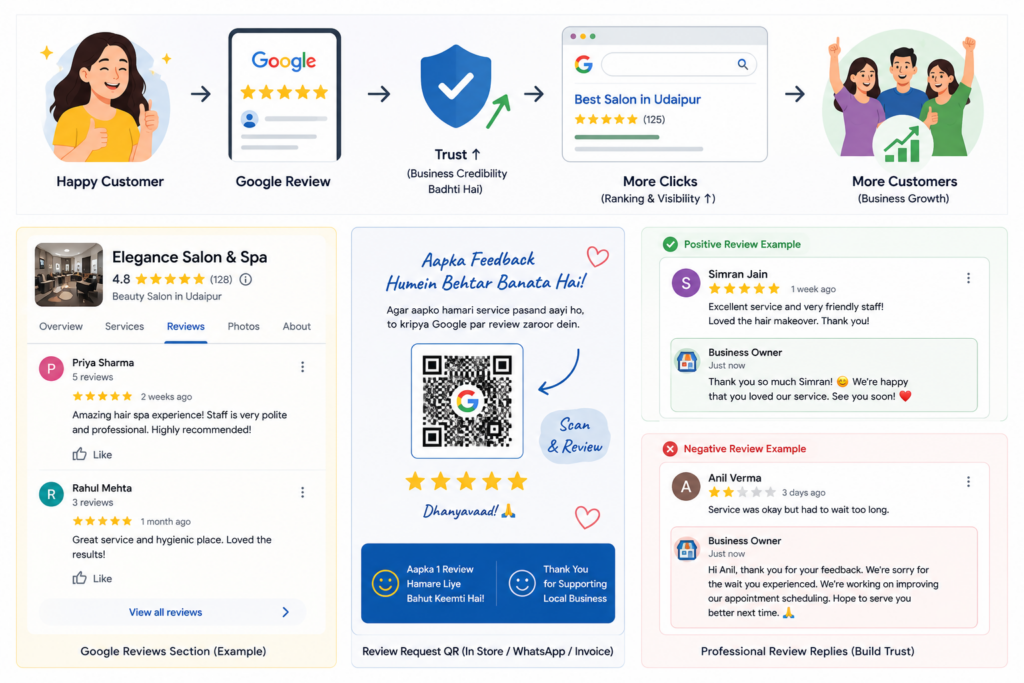
Reviews are one of the strongest local ranking factors and the single biggest trust signal for new customers. Ask happy customers directly, share your GBP review link via WhatsApp, and make it a habit after every positive interaction rather than an occasional campaign.
Review Responses
Respond to every review positive and negative professionally and promptly:
- Positive reviews: thank the customer, mention specifics, reinforce what they liked.
- Negative reviews: stay calm, acknowledge the concern, offer to resolve it offline, and never argue publicly.
A thoughtful response to a negative review often builds more trust with future customers than the review itself damages.
Q&A
The Q&A section is public and editable by anyone including you. Pre-populate it with the questions customers ask most often (parking availability, advance booking, payment methods) so accurate answers appear before someone else posts a misleading one.
Messaging
If you enable messaging, respond quickly. Slow or ignored messages are visible (Google shows average response time) and can quietly cost bookings.
Google Posts
Posts let you share updates, offers, and events directly on your profile. Use them for:
- Festival offers (Diwali specials, monsoon discounts)
- New menu items or services
- Events, workshops, or limited-time promotions
Posts expire after seven days for most types, so treat them as a light, recurring habit rather than a one-time task.
Advanced GBP Issues (And How to Handle Them)
This is where most guides stop but it’s where many Udaipur business owners actually get stuck.
Duplicate Profiles
Duplicate listings (often created by data aggregators, old agency setups, or accidental re-creation) split your reviews and confuse Google. Search your business name on Maps to check for duplicates, then request removal or merging of the incorrect one through Google’s “Suggest an edit” or Business Profile support.
Ownership and Access
If a previous employee, agency, or web developer claimed your profile and no longer has a working relationship with you, you can request ownership through Google’s official transfer or verification process. Never share your GBP login credentials loosely manage access through Google’s built-in owner/manager roles instead.
Verification
Google typically verifies new profiles via postcard, phone, email, or video verification, depending on the business category and location. Verification confirms the business is real and legitimately operated from the address given. Delays are common in India for certain categories patience and accurate documentation help.
Suspensions
Profiles get suspended for guideline violations keyword-stuffed names, fake addresses, review manipulation, or mismatched category use are common triggers. A suspension notice usually explains the reason; read it carefully before taking action.
Reinstatement
To reinstate a suspended profile:
- Identify and fix the specific guideline violation.
- Gather supporting documents (registration certificate, utility bill, GST certificate).
- Submit a reinstatement request through Google’s official form.
- Avoid creating a new duplicate listing while waiting this often delays reinstatement further.
Reinstatement timelines vary and Google does not guarantee a specific outcome or timeframe, so treat this as a process to follow correctly rather than one you can rush.
Multiple Locations
Businesses with more than one Udaipur outlet or locations across Rajasthan should manage all profiles under one Google Business Profile account using bulk location management, keeping each listing’s NAP, categories, and photos individually accurate rather than duplicated identically.
Service-Area Businesses
For businesses that travel to the customer (plumbers, tutors, event planners, pest control), hide your exact address, define clear service areas, and choose categories that reflect the service rather than a physical storefront. This keeps the profile compliant with Google’s guidelines for service-area businesses.
Also Read: How to Get More Customers from Google in Udaipur
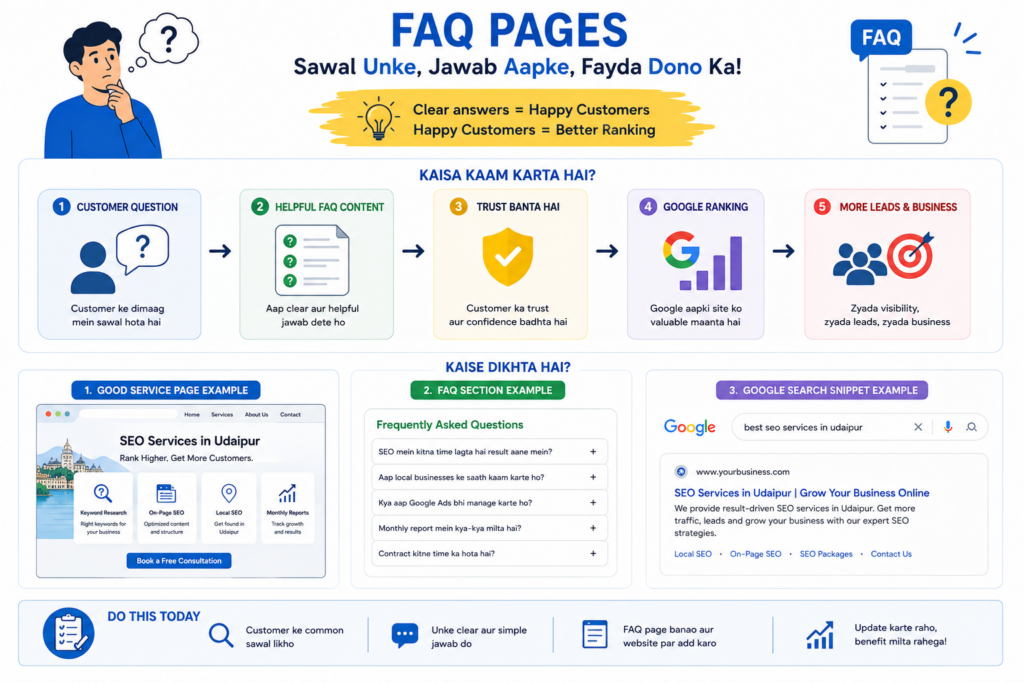
12. FAQ.
Q1. Is Google Business Profile free?
Yes. Creating, verifying, and managing a Google Business Profile is free. Costs only arise if you hire an agency or run paid Google Ads alongside it.
Q2. How long does Google Business Profile verification take?
It varies by method and category, phone or email verification can be instant, while postcard verification in India typically takes one to two weeks. Some categories require additional review time.
Q3. Why did my Google Business Profile get suspended?
Common causes include keyword-stuffed business names, inaccurate addresses, review manipulation, or using a category that doesn’t match the actual business. Google’s suspension notice usually states the specific reason.
Q4. How many photos should I upload to my GBP?
There’s no fixed number, but profiles with at least 10–15 varied, high-quality photos (exterior, interior, team, products) consistently perform better than sparse profiles.
Q5. Can I have more than one Google Business Profile for the same business?
No, duplicate listings for the same location violate Google’s guidelines and should be merged or removed, since they split reviews and confuse ranking signals.
Q6. Do Google reviews really affect local ranking?
Review count, recency, and rating are widely understood to influence local ranking, alongside relevance and proximity, though Google does not publish an exact ranking formula.
Conclusion
Google Business Profile optimization is not a single task you finish once it’s an ongoing relationship between your business and the customers searching for it. Getting the fundamentals right (name, address, hours, categories) earns you visibility; consistent photos, reviews, and posts earn you trust; and knowing how to handle advanced issues like duplicates or suspensions protects the visibility you’ve built.
There’s no shortcut and no guaranteed 1 ranking but a fully optimized, actively maintained profile consistently outperforms one that’s been set up once and forgotten. If you’d rather have this handled professionally, Immortal SEO works with Udaipur businesses on exactly this kind of hands-on local SEO. Get in touch for a free GBP audit and see where your profile currently stands.
About the Author

Richa Meena
SEO Specialist at ImmortalSEO with expertise in technical SEO and content optimization.
View all posts