
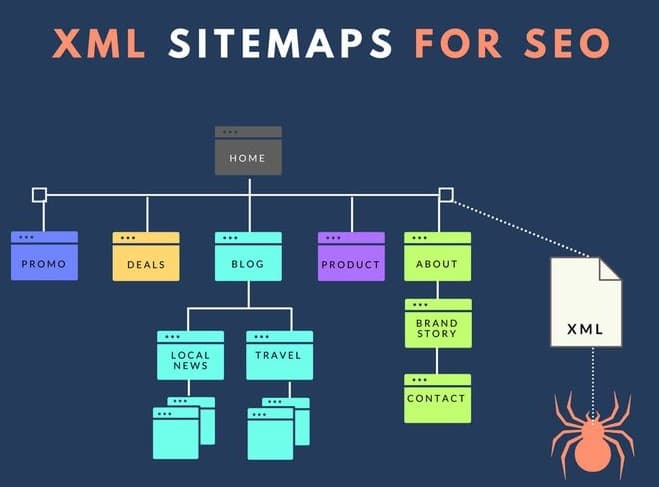
Imagine visiting Udaipur for the first time. A city map helps you find the places you need without getting lost.
An XML sitemap works in a similar way for search engines. It helps Google discover important pages on your website.
If you have launched a new website or added new services, an XML sitemap can help Google find those pages. Without one, some pages, especially those that are not linked to other pages may be harder for Google to discover.
In this guide, you will learn what an XML sitemap is, why it matters, how to optimize it, and how to submit it to Google.
What Is an XML Sitemap?
An XML sitemap is a file that lists the important URLs on your website to help search engines discover them.
XML stands for Extensible Markup Language. It is a structured format that search engines can read.
Think of your website as a building and your XML sitemap as its floor plan. It helps search engines understand which pages are available.
XML Sitemap vs. HTML Sitemap
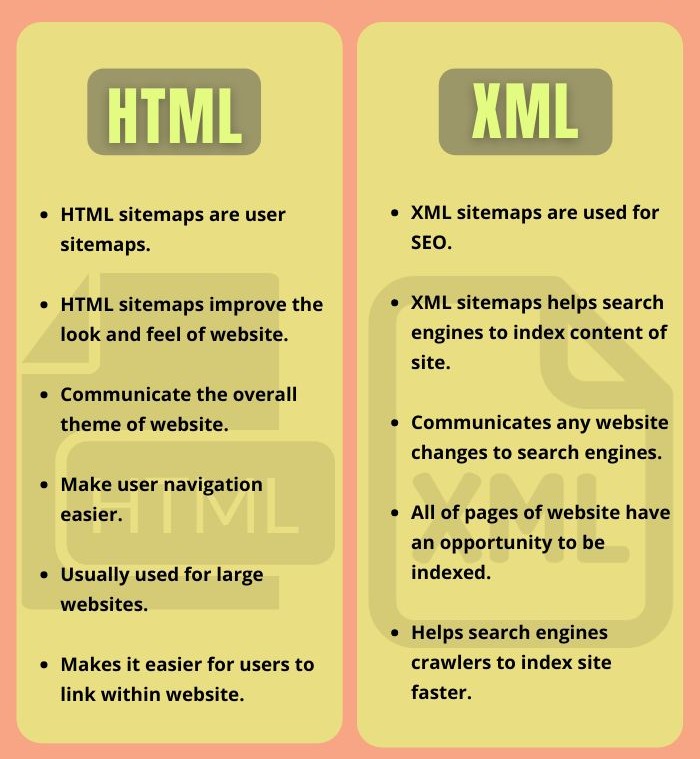
Both sitemaps help people or search engines navigate website content, but they serve different purposes.
| Feature | HTML Sitemap | XML Sitemap |
| Audience | Website visitors | Search engines |
| Format | A webpage with clickable links | A structured XML file |
| Main purpose | Help visitors navigate | Help search engines discover URLs |
| Location | Usually linked from the website | Often available at /sitemap.xml |
Why Is an XML Sitemap Important for Your Website?
An XML sitemap can support your website’s SEO in several ways.
1. Helps Google Discover New Pages
Suppose your hotel launches a new wedding package or your clinic adds a new treatment. A sitemap helps Google discover these pages, especially when they have few internal links.
2. Helps Search Engines Crawl Your Website Efficiently
A clean sitemap helps search engines identify the URLs you want them to discover.
Removing broken, duplicate, and unnecessary URLs also helps keep your sitemap organized.
3. Helps Search Engines Understand Your Website Structure
If your business offers multiple services, such as wedding catering and corporate catering, separate and clearly organized pages help search engines understand your content.
Your sitemap should list the preferred URLs you want search engines to discover.
Important: A sitemap helps Google discover pages, but it does not guarantee that every page will be indexed or ranked.
What Information Does an XML Sitemap Contain?
An XML sitemap can include the following information:
- <loc> — Page URL: The exact web address of a page.
- <lastmod> — Last Modified: The date the page was last significantly updated, when available.
- Image and video information: Optional details that help search engines discover relevant media.
Here is a simple example:
<url>
<loc>https://example.com/lake-view-dining/</loc>
<lastmod>2026-10-15</lastmod>
</url>
This entry identifies a webpage and records its last modification date.
How to Optimize an XML Sitemap
Most modern website platforms, including WordPress and Shopify, can generate sitemaps automatically. WordPress plugins such as Rank Math and Yoast SEO can also help manage them.
However, generating a sitemap is only the first step. You should also ensure that it contains the right URLs.
1. Include Only Important, Working Pages
Your sitemap should contain pages you want search engines to discover and potentially show in search results.
Include:
- Homepage
- About Us page
- Main service or product pages
- Valuable blog articles
- Contact page
- Relevant location pages
Exclude:
- Thank-you pages
- Internal search result pages
- Login or password-protected pages
- Unnecessary duplicate archive pages
- Broken URLs returning a 404 error
- Pages intentionally marked as noindex
2. Keep the Last Modified Date Accurate
The lastmod tag should reflect genuine, significant updates to a page.
For example:
- Updating service prices
- Adding new services
- Rewriting important content
- Adding relevant customer testimonials
Avoid changing the date for minor edits that do not meaningfully update the page.
3. Organize Large Sitemaps
Google allows a maximum of 50,000 URLs or 50 MB per sitemap file, before compression.
If your website contains many pages, you can divide them into smaller sitemaps, such as:
- page-sitemap.xml — Main website pages
- post-sitemap.xml — Blog articles
- product-sitemap.xml — Product pages
- sitemap_index.xml — A master file listing individual sitemaps
This structure makes large websites easier to manage.
4. Include Separate Pages for Different Business Locations
If your business operates from multiple locations, create a dedicated page for each location when it provides useful, unique information.
For example, a clinic with branches in Hiran Magri and Sukher may have separate pages containing each branch’s address, services, and contact details.
Include these pages in your sitemap if they are indexable and intended to appear in search results.
Common XML Sitemap Mistakes to Avoid
Even if your sitemap is working, these mistakes can create unnecessary SEO issues.
1. Including Noindex Pages
A noindex tag tells search engines not to include a page in search results.
Including such pages in your sitemap sends conflicting signals. Remove URLs that are intentionally marked noindex.
2. Keeping Broken URLs
If you delete a service page or discontinue an offer, check whether its URL is still listed in your sitemap.
Remove URLs that return 404 errors. If a page has moved permanently, update the sitemap to use the appropriate destination URL.
3. Mixing HTTP and HTTPS URLs
If your website uses HTTPS, ensure your sitemap contains the correct HTTPS versions of your URLs.
Avoid including outdated HTTP versions or conflicting www and non-www URLs when they redirect to a preferred version.
How to Submit Your XML Sitemap to Google Search Console
Creating a sitemap is not enough. You can submit it through Google Search Console to help Google discover it.
Follow these steps:
- Open Google Search Console: Visit Google Search Console.
- Select your website: Choose the verified website property.
- Open Sitemaps: Go to Indexing → Sitemaps.
- Enter your sitemap URL: For example, sitemap.xml or sitemap_index.xml.
- Click Submit: Send the sitemap to Google.
- Check the status: Review the submission status and any reported errors.
If Google reports a fetching error, check that the sitemap URL is correct, accessible, and not blocked by your website’s configuration.
Remember: A successful submission does not guarantee that Google will index every URL.
How an XML Sitemap Supports Local SEO
For local businesses, an XML sitemap works alongside other SEO efforts.
Google Business Profile
Your Google Business Profile directs potential customers to your website. Keeping your important landing pages accessible and indexable supports your overall online presence.
Location-Based Search Visibility
If you want to appear for searches such as “dental clinic in Hiran Magri” or “banquet hall near Fatehsagar,” create useful pages that clearly explain your services and locations.
Including eligible location pages in your sitemap helps Google discover them. However, rankings also depend on factors such as content quality, relevance, and your overall online presence.
XML Sitemap Health Checklist
Review your sitemap regularly using this checklist.
- Sitemap accessible: Open your sitemap URL and check that it loads correctly.
- Listed in robots.txt: Check whether your robots.txt file references the sitemap.
- Working URLs: Ensure listed URLs return the expected status, usually 200 OK.
- No unnecessary pages: Remove broken, duplicate, and noindex URLs.
- Google Search Console checked: Review sitemap status and reported errors.
- New pages included: Confirm that important new services, products, and location pages are listed.
Conclusion
An XML sitemap helps search engines discover the important pages on your website. But simply creating one is not enough, you also need to keep it accurate, organized, and free of unnecessary URLs.
Start by checking your sitemap, removing errors, and submitting it through Google Search Console.
At Immortal SEO, we help businesses identify website issues that may affect their search visibility. If you want to understand your website’s technical health or improve your organic search presence, contact our team for guidance.
FAQs
1. Does an XML sitemap guarantee a #1 ranking on Google?
No. An XML sitemap helps Google discover your pages, but rankings depend on several factors, including content quality, relevance, user experience, and website authority.
2. How often does Google crawl an XML sitemap?
There is no fixed schedule. Google decides when to revisit URLs based on factors such as changes to the website and its crawling needs. Submitting a sitemap does not guarantee an immediate crawl.
3. What happens if my website does not have an XML sitemap?
Google can still discover pages by following links between webpages. However, a sitemap can be particularly helpful for new websites, large websites, and pages that have few internal links.
4. Can I submit my XML sitemap to search engines other than Google?
Yes. You can submit your sitemap through Bing Webmaster Tools to help Bing discover your website’s URLs.
About the Author

Richa Meena
SEO Specialist at ImmortalSEO with expertise in technical SEO and content optimization.
View all posts