
As a business owner, you invest time and money in building a good website. You want local customers searching on Google, whether they need a table at a rooftop restaurant, an appointment at a dental clinic, or custom bridal jewellery, to find your business easily.
But despite having great photos, quality services, and positive reviews, many businesses struggle to get past page 3 or 4 of Google search results.
The problem may not be your services or reputation. It could be a hidden technical issue called duplicate content. Understanding hidden technical seo causes and practical fixes can help you identify why your website pages may be competing against each other and what you can ask your web development team to do about it.
What Is Duplicate Content?
Imagine you open a clinic or retail showroom in the city. You put up three different entrance signs on three different doors:
- Door 1: City Wellness Centre
- Door 2: City Wellness Centre (Official)
- Door 3: www.City Wellness Centre
All three doors lead straight into the exact same waiting lobby. To a human walking past, this might feel a little unusual, but they can still step inside.
To an automated search engine like Googlebot, however, each entrance looks like a completely different business competing for the same customers on the same street. Google gets confused about which door to recommend, and when Google gets confused, it often stops showing your website prominently altogether.
That is duplicate content in plain terms. It happens when identical or nearly identical pages on your website exist at more than one web link (URL).
The Confusion at the Front Desk
Google’s mission is simple: when someone types a query into their phone, Google wants to show them one single, clear, high-quality answer. If your website presents Google with three versions of your pricing page or room catalogue, Google does not know which one is the master copy.
Instead of showing all three, Google tries to guess. If it guesses incorrectly, your prospective customers end up on a broken, empty, or outdated page.
Does Google Ban You for This?
Many business owners worry that Google will penalize or blacklist their website the moment duplicate pages exist.
Rest easy: Google does not ban websites simply because their web software accidentally created duplicate links. Google understands that most business owners are not computer engineers. However, while you will not get an official penalty, you face a quiet filter. Google filters out your extra pages, which often pulls your entire site down in search rankings.
Why This Quietly Costs Your Business Money
You do not need to care about website code, but you do need to care about revenue. Here is how duplicate pages hurt your bottom line:
1. Your Google Strength Gets Cut in Half
Think of backlinks links from local news sites, tourism guides, or business directories as customer recommendations.
If five local portals recommend your business, your site grows stronger on Google. But if two of them link to [http://yourbusiness.com](http://yourbusiness.com) and three link to [https://www.yourbusiness.com](https://www.yourbusiness.com), your reputation gets split right down the middle. Instead of having one strong, authoritative website on page 1 of Google, you end up with two weak pages sitting on page 3 where no one ever clicks.
2. Google Shows the Wrong Door to Your Customers
Imagine a traveler looking for a boutique suite for a weekend stay. They search on their phone, click your website link, and land on an unstyled “printer view” page with no booking button, no photos, and no phone number.
They leave immediately and book with your competitor down the road. Duplicate pages frequently cause Google to rank the wrong page instead of your primary booking or contact page.
3. The Search Engine Gives Up Before Reading Your Best Pages
Google assigns a limited amount of reading time to every website. If your website platform automatically produces hundreds of useless duplicate pages, Google spends its reading time on those identical pages and leaves before discovering your latest Diwali offers, newly launched packages, or updated menu.
Everyday Ways Your Website Accidentally Duplicates Itself
Most business owners assume duplicate content only happens if someone steals text from a rival website. In reality, over 80% of duplicate pages happen automatically because of how website systems work behind the scenes.
How Your Website Accidentally Clones Itself
1. Multiple Addresses -> http://, https://, and www
2. Shopping Filters -> ?sort=price, ?color=blue
3. Print Buttons -> /print/ versions of service pages
4. Copied City Pages -> Same text, just changing the area
5. Social Media Tags -> ?utm_source=facebook campaign links
6. CMS Category Bloat -> Same article under 5 empty tags
1. The Four Front Doors Problem (http, https, and www)
To you, these four addresses open your same homepage:
- [http://myhotel.com](http://myhotel.com)
- [https://myhotel.com](https://myhotel.com)
- [http://www.myhotel.com](http://www.myhotel.com)
- [https://www.myhotel.com](https://www.myhotel.com)
To a web browser, they might look identical. But to Google, these are four completely separate websites. If your website hosting lets all four run live without steering everyone to one official version, your site is competing against three identical copies of itself.
2. Product Sorting and Filter Buttons
If you sell handcrafted leather bags, marble handicrafts, or tour packages, your website probably has a drop-down menu that lets visitors sort by:
- “Price: Low to High”
- “Most Popular”
- “Newest Arrivals”
Every time a customer clicks “Sort by Price,” the website often generates a new link with extra letters at the end (like ?sort=price). The products on the screen are the same, but Google sees a fresh web page. If you have dozens of filters, your website can accidentally generate hundreds of duplicate pages overnight.
3. The “Print This Page” Trap
Many older website templates automatically include a small “Print Page” icon at the bottom of blog articles or service lists. Clicking it generates a stripped-down version of the article at a link like /services/print/. Unless your web designer told Google to ignore that print page, Google might index it and rank it right alongside your main page.
4. Copy-Pasting the Same Words Across Different Locations
This is one of the most common mistakes local business owners make.
Suppose you run an interior design or pest control business serving multiple areas across Udaipur, such as Hiran Magri, Sukher, and Pratap Nagar. To save time, you create three pages:
- /pest-control-hiran-magri
- /pest-control-sukher
- /pest-control-pratap-nagar
On each page, you use the exact same 400 words of text, only changing the neighborhood name in the headline. Google easily detects this copy-paste shortcut. Instead of ranking you across all three neighborhoods, Google often flags them as low-value duplicates and ranks none of them.
5. Tracking Links from Social Media Campaigns
When you run festive promotions or lead ads on Instagram and Facebook, marketing links often have tracking codes attached to the end (such as ?utm_source=instagram). If search engines discover those promotional links, they may read and index them as duplicate copies of your primary landing page.
6. Unorganized Blog Categories and Tags
Platforms like WordPress make publishing articles easy, but every time you add five different tags (like “Health”, “Fitness”, “Tips”, “Doctor”, “Udaipur”) to a single 300-word post, WordPress creates five separate archive pages showing that same short snippet. This clutters your website with duplicate, thin pages that provide zero value to readers.
Plain-English Fixes You Can Ask Your Web Team to Handle
You do not have to write code to solve these issues. You simply need to know what to ask your web developer or agency to put in place.
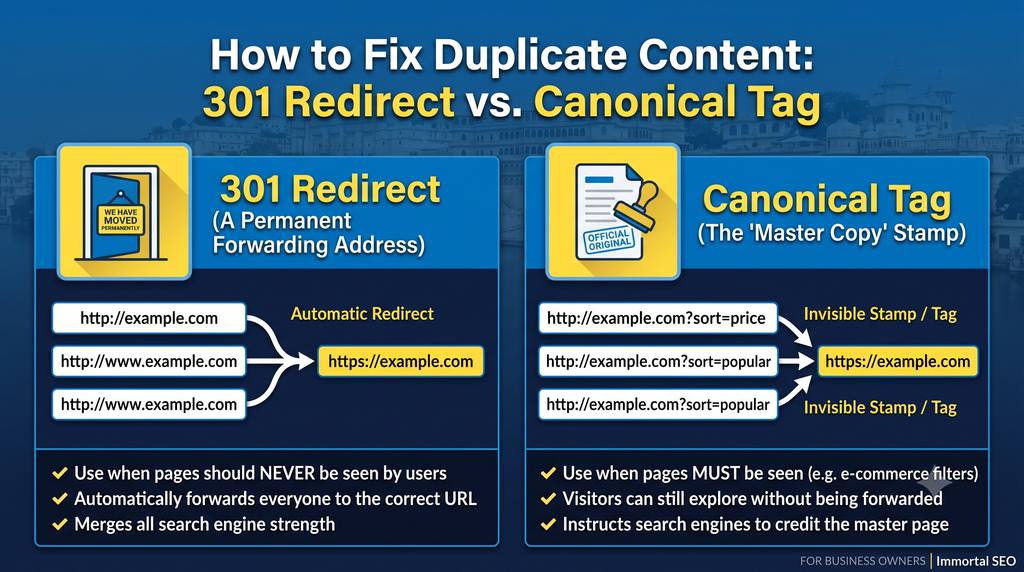
Fix 1: Set Up an Automatic Forwarding Rule (301 Redirect)
What it is in plain English:
Think of this as going to the post office and setting up a permanent mail-forwarding request when your office changes locations.
Whenever someone types an old, unsecure, or non-www address, the server instantly forwards them to your one official website address.
What to tell your web team:
“Please set up a 301 redirect rule on our hosting server so that all versions of our website (HTTP and non-WWW) automatically route to our single official HTTPS address.”
Fix 2: Give Google an Official Master Copy Stamp (Canonical Tag)
What it is in plain English:
Imagine you photocopy ten copies of an important legal contract for staff to read during a meeting, but you stamp “OFFICIAL ORIGINAL” on copy number one.
A canonical tag does exactly that. When customers use filters to sort hotel rooms or jewelry by price, the filter page remains active for the customer, but it carries an invisible stamp telling Google: “Credit all search rankings to our main overview page, not this filter view.”
What to tell your web team:
“Please ensure our product, package, and service filter pages have a canonical tag pointing back to the main category page.”
Fix 3: Write Genuine Local Stories for Each Branch
What it is in plain English:
Instead of copy-pasting the same description across every neighborhood page, make each page tell a real, local story.
If you have a clinic in Fatehpura and another in Sector 4:
- Show real photos of the staff and reception area at that specific branch.
- Mention nearby landmarks (for example: “Located just 200 meters from Chetak Circle”).
- Add genuine reviews from clients who actually visit that branch.
- Embed the exact Google Maps location for that office.
This gives Google genuinely unique content to read, helping you rank honestly across multiple parts of town.
Fix 4: Turn Off Useless Tag Pages
What it is in plain English:
Tell your website to stop inviting Google to inspect empty filing folders.
Your web team can add a simple instruction (called a noindex tag) to empty search pages, product tags, and archive lists. Customers can still click through them easily, but Google stops wasting time indexing them in search results.
What to tell your web team:
“Please set our blog tag archives and search result pages to ‘noindex, follow’ so we don’t build up index bloat.”
Quick Decision Guide: What Should Your Business Do?
Here is a straightforward reference table you can share directly with your digital manager or web agency:
| The Problem on Your Website | Everyday Example | The Correct Fix | What Your Customer Experiences |
| Multiple site versions | [http://site.com](http://site.com) and [https://site.com](https://site.com) both open | 301 Permanent Redirect | Seamless; visitor automatically lands on the secure page |
| Product sorting & filters | /rooms?sort=low-price vs /rooms | Canonical Tag (Master Copy Stamp) | Visitor sees their filtered list; Google credits your main room page |
| Neighborhood pages | Identical service text copied across 5 local areas | Rewrite with Local Context | Visitor gets real directions, photos, and local reviews |
| Empty tags & archives | 20 empty tag pages on WordPress | Noindex Directive | Visitor can browse; Google skips indexing the empty pages |
| Old test or staging site | A test.yourdomain.com site left online by a designer | Password-Protect or Block | Prevents Google from reading your unreleased draft site |
A 5-Minute Checklist for Business Owners
You do not need fancy technical tools to check your own website today. Take five minutes and try this right from your laptop or phone:
- [ ] Check your address bar: Type your domain as [http://yourwebsite.com](http://yourwebsite.com) (without the ‘s’). Does it immediately switch to https:// with a secure lock icon? If not, you have a duplicate protocol issue.
- [ ] Check with and without www: Type [www.yourwebsite.com](https://www.yourwebsite.com), then type yourwebsite.com. Do both land on the exact same spelling in the address bar?
- [ ] Search Google for your own domain: Go to Google and search site:yourwebsite.com. Scroll through the first three pages of results. Do you see repeated titles, empty tag pages, or test pages showing up?
- [ ] Review your local pages: Open your different service or location pages side-by-side. Is 90% of the text identical? If yes, it is time to give each page its own local identity.
- [ ] Ask your web team: Ask them when they last checked your website’s canonical tags and Google Search Console index report.
Also Read: 301 vs 302 Redirects: Which One Should You Use for SEO?
How Immortal SEO Helps Your Business Stay Ahead
Managing a growing business in Udaipur takes all your attention from delivering great service and managing team members to handling daily client inquiries. You should not have to spend your evenings untangling website code or worrying about whether Google is reading the wrong page.
At Immortal SEO, we speak straightforward business language. We inspect your website’s digital plumbing, clear out duplicate confusion, and make sure search engines see your business clearly. When your website runs cleanly, your brand gets the local visibility, calls, and bookings it truly deserves.
FAQ
Q: What is the simplest difference between a redirect and a canonical tag?
A: Think of a redirect as forwarding your phone number: when a customer dials the old number, the call automatically rings at the new one. A canonical tag is like having two store entrances, but hanging a sign above entrance two that says: “Please register all sales at Counter 1.”
Q: Is it okay to use manufacturer descriptions for products I sell in my shop?
A: It is very common, but it causes duplicate content issues. If fifty retail stores across the country copy and paste the manufacturer’s exact product description, Google will usually rank the biggest, oldest retailer and ignore the rest. Writing two or three unique sentences in your own words helps your product stand out.
Q: Does having an active Facebook page or Instagram page create duplicate content with my website?
A: No. Social media platforms and your official website are completely separate entities. Sharing a link to your website on Instagram or Facebook helps bring in traffic; it does not trigger duplicate content penalties on Google.
Conclusion
Your website should work for your business, not fight against itself. Resolving duplicate pages isn’t about mastering complex code, it is simply about giving Google one clear, official doorway to your brand. With proper redirects and clean canonical tags in place, you protect your ranking strength, help local customers find the right services immediately, and ensure your digital presence delivers real growth.
About the Author

Richa Meena
SEO Specialist at ImmortalSEO with expertise in technical SEO and content optimization.
View all posts